Running Shoes Tracking
Monitor your running shoe mileage to know when it's time for a new pair.
Why Track Shoes?
Running shoes have a limited lifespan:
- Cushioning breaks down over time
- Reduced shock absorption increases injury risk
- Worn shoes affect running form
- Performance declines
Treadmill Assistant helps you replace shoes at the right time.
Accessing Shoe Tracking
- Tap Equipment tab (wrench icon) in bottom navigation
- Scroll to Running Shoes section
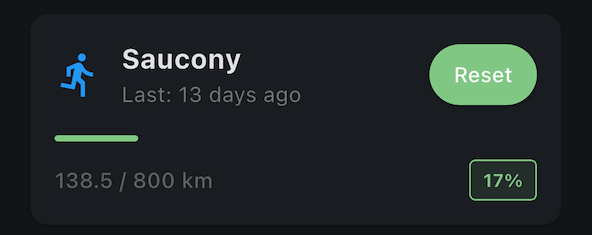
- View current mileage and replacement status
How It Works
Automatic Distance Tracking
Every workout on the treadmill:
- Distance is automatically added to shoe mileage
- No manual entry needed
- Accumulates over time
Current Shoes
The app tracks:
- Distance run in current shoes (km)
- Progress toward replacement interval
- Optional shoe name/model (for your reference)
Shoe Replacement Interval
Most running shoes last 500-1000 km before needing replacement, but consult the manufaturer's instructions on when to replace your shoes and follow common sense.
Factors Affecting Lifespan
- Running surface: Treadmill is easier on shoes than pavement
- Body weight: Heavier runners wear shoes faster
- Running style: Heel strikers may wear out shoes quicker
- Shoe quality: Premium shoes often last longer
Adjust Your Interval
- Go to Settings > Equipment Maintenance
- Find Running Shoes section
- Set Replacement Distance (km)

Warning Status
Progress Indicator
Visual progress bar shows how much life remains:
| Progress | Status | Meaning |
|---|---|---|
| Below warning threshold | ⚪ Normal | Plenty of life left |
| Between warning and urgent | 🟡 Warning | Start shopping for new shoes |
| At or above urgent threshold | 🔴 Urgent | Replace soon |
| >100% | 🔴 OVERDUE | Replace immediately |
By default, warning threshold is 50% and urgent threshold is 80%. You can customize these in Settings > Equipment Maintenance > Warning Thresholds. See Treadmill Maintenance for details.
Warnings on Home Screen
When shoes reach the urgent threshold or are overdue:
- Warning card appears on main screen
- Reminds you to replace shoes
- Tap to navigate to Equipment screen
Resetting Shoe Tracking
When to Reset
Reset when you:
- Start using a new pair of shoes
- Replace your current shoes
- Want to track from zero again
How to Reset
- Go to Equipment tab
- Find Running Shoes card
- Tap Reset button
- Distance resets to 0 km
- Start tracking your new shoes!
Naming Your Shoes (Optional)
Add Shoe Name
To remember which shoes you're tracking:
- Go to Equipment tab
- Find Running Shoes card
- Tap Edit (if available) or name field
- Enter shoe model (e.g., "Nike Pegasus 40", "Brooks Ghost 15")
- Save

Signs You Need New Shoes
Beyond the distance tracker, watch for:
Physical Signs
- Worn outsole - Tread pattern smooth or gone
- Compressed midsole - Lost cushioning, feels flat
- Upper damage - Holes, tears, or separation
- Uneven wear - One side more worn than other
Performance Signs
- Increased soreness - Feet, knees, or hips hurt more
- Reduced comfort - Shoes feel hard or uncomfortable
- Changed gait - Running form feels off
- More fatigue - Legs tire faster than usual
Rule of Thumb
If in doubt, err on the side of replacing sooner. Injury prevention is worth more than extending shoe life.
Multiple Pairs of Shoes
Current Limitation
Treadmill Assistant currently tracks only one pair at a time.
If you rotate between multiple shoes:
- Tracking represents combined mileage
- Or pick your primary pair to track
- Consider external shoe tracking apps for multiple pairs
Future Feature
Multiple shoe tracking may be added based on user demand.
Shoe Lifespan Guidelines
By Distance
- Budget shoes: 500-650 km
- Mid-range shoes: 650-800 km
- Premium shoes: 800-1000 km
By Time
Even with low mileage, replace shoes after:
- 6-12 months of regular use (cushioning degrades over time)
- Stored shoes may last longer but inspect before using
By Feel
The best indicator: How do they feel?
- Shoes should feel cushioned and supportive
- If they feel "dead", replace them regardless of mileage
Tracking Accuracy
What's Tracked
- Only treadmill workouts recorded in Treadmill Assistant
- Based on distance from treadmill sensors
What's NOT Tracked
- Outdoor runs
- Runs on other treadmills
- Other activities in the same shoes (walking, gym, etc.)
For Complete Tracking
If you use shoes outside the app:
- Estimate outdoor mileage
- Adjust replacement interval accordingly
- Or use dedicated running shoe tracking apps
Next Steps
- Track treadmill maintenance - Belt lubrication and replacement
- Configure intervals - Adjust replacement distance
- Equipment tips - Best practices for shoe longevity
More shoe questions? Consult shoe manufacturer recommendations or running specialty stores.